Knowledge Center documents
Knowledge Center (KC) is a central repository of documents which provide you with an easy access to the frequently used solution descriptions.
Note
Knowledge Center documents are only available if your company uses USU Knowledge Center and if it is connected to the Self-Service Portal.
To search for the Knowledge Center documents by a specific term:
Enter a key term into the search box.
Press Enter.
The search results are listed below in the search result window.
Scroll down to the KC Documents category.
Here you can find if the search term matches some KC documents.
Select the required KC document.
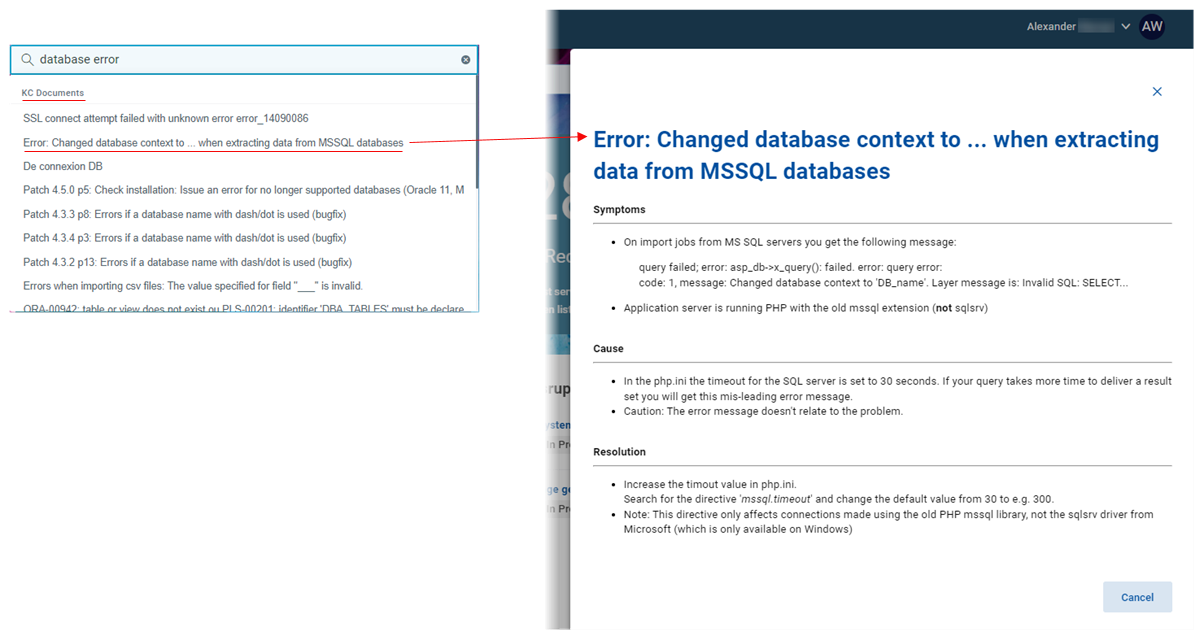
Click the document.
The corresponding KC document opens in a drawer on the right.
To create a ticked directly from the KC document:
Enter a key term into the search box.
Press Enter.
The search results are listed below in the search result window.
Scroll down to the KC Documents category.
Here you can find if the search term matches some KC documents.
Select the required KC document.
Click the document.
The corresponding KC document opens in a drawer on the right.
If you don't find the right solution, you can create a ticket from here immediately.
Click Create ticket.
The Create ticket dialog opens allowing you to create a ticket.