Read-only attribute in detail
Use a parameter of type Read-only attribute to dynamically provide contextual information about an object selected in another (business object) parameter of the offer. For example, when a person is selected in a business object parameter of the offer, a read-only parameter can display the person's location.
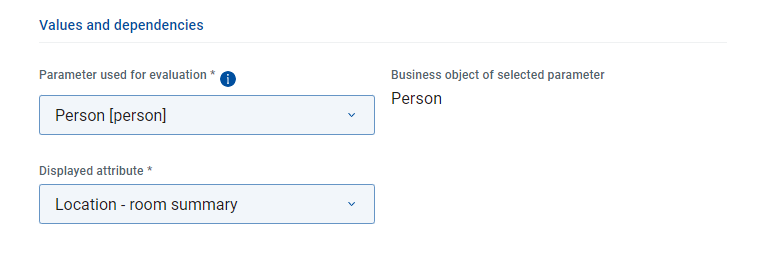
Parameter used for evaluation | Select the business object parameter of the offer whose attribute value should be displayed by the read-only attribute. |
Business object of selected parameter | This field informs you of the USU Service Management object type connected to the selected business object attribute. This information may be useful if additional object type customization is necessary on the USM side. |
Displayed attribute | Select the actual attribute (of the object of the previously selected parameter) whose value will be displayed. Note that a set of attributes pre-defined for this purpose on the USM side is available by default. If your desired attribute is not listed in the Displayed attributes drop-down, it can be made available by additional USM customization - see Adding a new display attribute to the USM object type below for more information. |
Please note the following:
Only single-selection business object parameters can be used as the source of read-only attributes (i.e. selected as 'Parameter used for evaluation').
No parameter dependencies can be defined for read-only attributes.
For a streamlined user experience, it is recommended to use read-only attributes in connection with conditional visibility rules. See the Usage example topic for inspiration.
If the Displayed attributes drop-down list does not contain the attribute which you want to display, then this attribute has probably not been included in the default set of attributes pre-defined for this purpose. In such case, the attribute must be added manually in USU service Management.
Open the USU Service Management application, switch to the USU Shop fulfillment business view and locate the Object type configurations for USU Shop catalog.
In the catalog, locate the configuration object belonging to the USM object type whose attribute you want to display. Open it for editing.
For example, if you want to display the cost center of a person selected in a Person business object parameter, locate the configuration object.
In the USU Shop read-only attributes section of the editor, you will find the already defined read-only attributes. Click the + button at the top of the section. A Choose attribute dialog opens.
Select the attribute which you want to make available as a read-only attribute in the Shop. (Note that only simple attributes can be used, it is not possible to have calculated read-only attributes.)
To continue the example in step 2, select the attribute.
Click OK in the Choose attribute dialog and save the configuration object changes.
The attribute should now be available in the Shop as a read-only attribute of the parameter (or any Shop parameter based on USM object type ).
Note that object type configuration is part of cached USM data. If you want to see the result immediately (i.e. before the next regular cached data reload), force-clear cached USM data using the Clear cache button under Shop settings/Configuration.