
Requestor management

Use the Requestor management page to create and administer Shop requestors, i.e., to determine for whom individual Shop users can request.

The concept of requestor management

Shop users can either request for themselves (typical end user requesting) or for others (e.g., department managers requesting for their subordinates, IT personnel requesting IT-related goods and services for other employees). Shop requestor management ensures that individual users can request within the scope of their responsibility.

The following logic applies:

  • All Shop users can request for themselves

  • If a Shop user should be able to also request for others, a Shop requestor must be created for this user. The requestor definition specifies for whom the user can request.

    • The requestor may be allowed to request for all persons in the organization (recipients).

    • The requestor may only be allowed to request for specific recipients. Recipients can be specified by selecting individual persons or pre-defined groups of persons (so called recipient groups defined in USU Service Management).

The Requestors management page

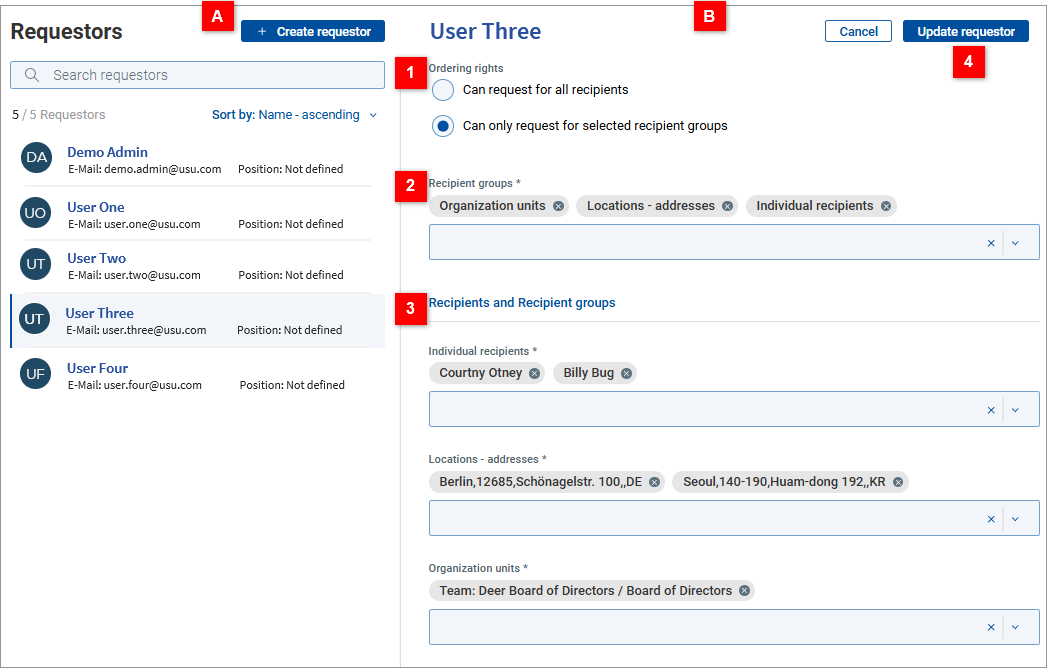
Click the Requestors icon in the main Shop sidebar to open the Requestor management page.
ReqtrMgmt.png

A.png

List of requestors

Existing requestors are listed here. Standard sorting and searching functionality is provided in the list. Use the Create requestor button to create new requestor definitions.

B.png

Requestor detail

Detail view of the requestor definition. Edit mode (depicted above) and read mode are available.

1.png

Ordering rights

  • Edit mode: Select the requestor's scope of requesting.

    • Can request for all recipients - Choose this option to allow the requestor to request for everybody. No further specification is necessary in this case.

    • Can only request for selected recipient groups - Choose this option to allow the requestor to request only for specific recipients. The recipients will be specified in sections 2 and 3 (see below).

  • Read mode: See the requestor's scope of requesting. If the requestor can request for all recipients, this is the only information displayed in the requestor detail.

2.png

Recipient groups

  • Edit mode: Choose the type(s) of recipient group for further selection in section 3. Two scenarios are possible:

    • If you want to select individual recipients across the organization (i.e., regardless of their affiliation to organization units, cost centers, etc.), choose item Individual recipients from the Recipient groups dropdown box. This will display the Individual recipients dropdown in section 3 where you will be able to select individual recipients.

      Example: To enable requesting for persons Mr. Green, Ms. Amber and Ms. Haze, choose Individual recipients from the Recipient groups dropdown box, then select Mr. Green, Ms. Amber and Ms. Haze from the Individual recipients dropdown in section 3.

    • If you want the selection of recipients to be governed by their affiliation to existing organizational structures, choose corresponding recipient group type(s) from the Recipient groups dropdown box. This will display corresponding dropdown box(es) in section 3 where you will be able to select individual recipient groups of the chosen group types.

      Important note: Only recipient group types which have been defined for this purpose in USU Service Management are available in the Recipient groups dropdown.

      Example: To enable requesting for all persons belonging to organization units Sales and Marketing and all persons belonging to cost center Headquarters (Chicago), select Organization units and Cost centers from the Recipient groups dropdown box, then in section 3 select Sales and Marketing from the Organization units dropdown and Headquarters (Chicago) from the Cost centers dropdown. (Names of recipient groups and recipient group types used here are just an example of possible data.)

    Notes:

    - Option Individual recipients is always available (i.e., regardless of underlying Recipient group types preparation in USU Service Management).

    - It is possible to combine the selection of individual recipients and selection of recipients via recipient groups.

  • Read mode: See which recipient group types are used by this requestor definition to select for whom the requestor can request.

3.png

Recipients and Recipient groups

  • Edit mode: Section Recipients and Recipient groups displays a dropdown box for each of the recipient group types chosen in Recipient groups above.

    • Use the 'Individual recipients' dropdown (if present) to enable requesting for individual persons.

    • Use dropdown(s) corresponding to the recipient group type(s) chosen in section Recipient groups to make group selection(s) of persons. All persons belonging to the selected recipient group(s) will be registered as persons for whom the edited requestor can request.

    Combination of recipients from different recipient groups is handled in 'logical OR' fashion (i.e., the set of recipients broadens by selecting more recipient groups).

  • Read mode: See for whom the requestor can request.

    • In section Individual recipients (if present): See individual persons and their email addresses.

    • In section(s) corresponding to the recipient group type(s) used by the requestor definition:

      - See the recipient group(s) used for group-selection the persons for whom the requestor can request.

      - Click the See all recipients link next to each recipient group to see all persons belonging to this group.

4.png

Available actions

  • Edit mode:

    • Cancel - discard changes made in the editor and switch to the read mode.

    • Update requestor - save changes made in the editor and switch to the read mode.

  • Read mode:

    • Edit requestor - switch to the edit mode.

    • ... Actions - additional actions. Use action Delete (the only item currently available) to delete the requestor definition.